A MOHID alternative for the screen — and only the screen.
MOHID is a masjid ERP. Donations, membership, hifz classes, zakat, bookkeeping, communications, and somewhere in that list, a bulletin board. If the display is the part that disappoints you, you do not have to replace the whole thing.
SalahClock is not a MOHID replacement and this page will not pretend it is. MOHID handles donation processing, membership records, program registration, zakat, and the masjid’s books. We do none of that. What we do is the prayer-time display, and we do considerably more of it than MOHID’s signage module does.
For most mosques already on MOHID, the right answer is both. Keep MOHID for the money and the members; put SalahClock on the hall screens. It costs $96 a year on Plus, needs no signage player at $100 a device, opens on the TVs you already own, and keeps running when the Wi-Fi does not. If you are choosing from scratch and the display is genuinely the main requirement, MOHID at $99–$199 a month is a lot of platform to buy for a screen.
- Choose MOHID if
- You need donations, membership, classes and the masjid's accounts in one system, and the screen is a bonus.
- Choose SalahClock if
- The screen is the point — or you already run MOHID and want the hall display to be better than a bulletin board.
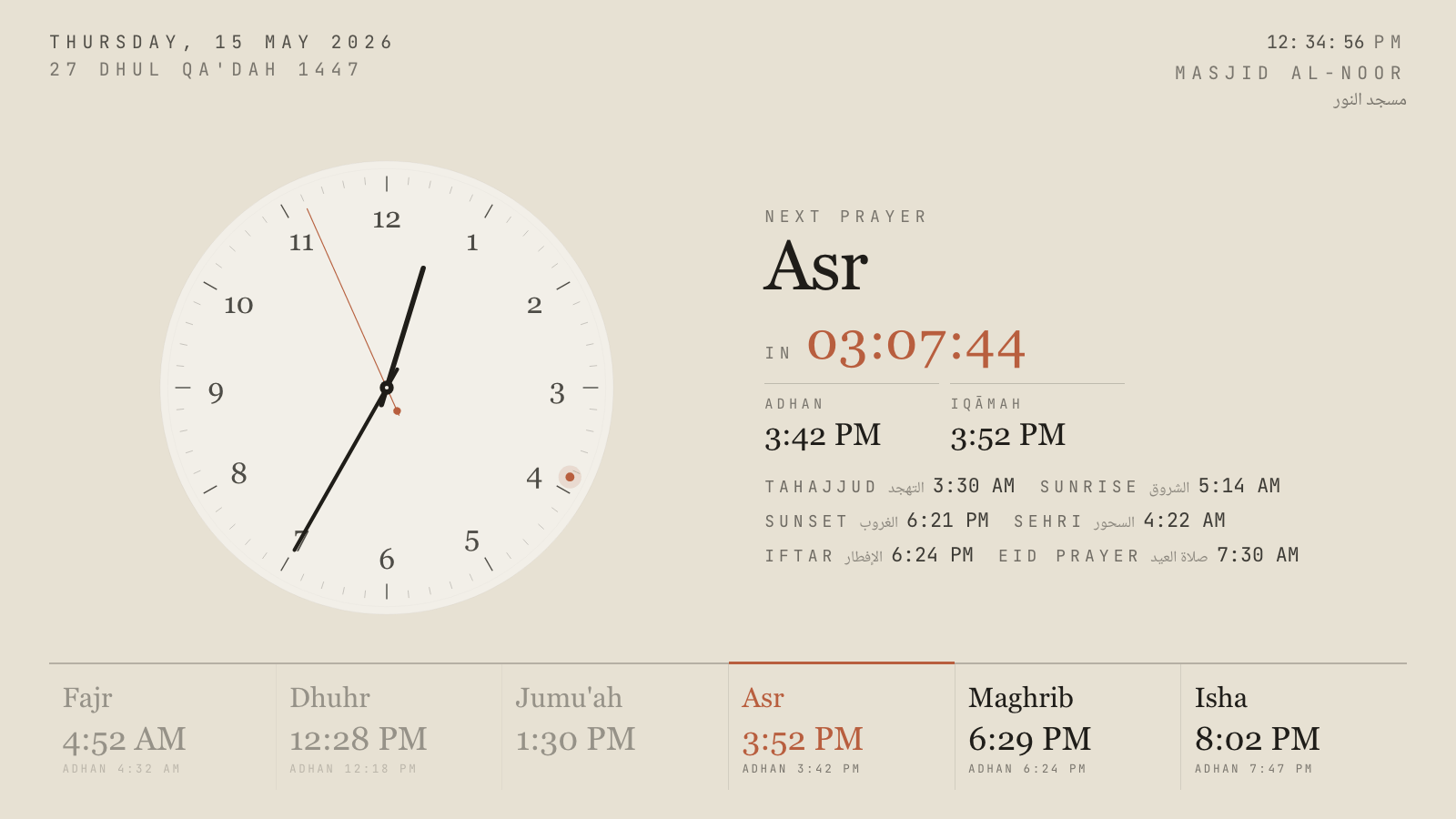
Hushed Hour, one of eighteen themes. Every one has a portrait variant.
These are not the same product
Most pages of this kind pretend two products are interchangeable. This one cannot. MOHID sells a masjid operating system: donation management with its own card processing, membership tracking, program and class registration, fundraising campaigns, zakat management, financials and bookkeeping, email and SMS communication, and a hardware line that includes a $999 donation kiosk and a family of tap-to-pay readers.
Inside that list sit two display-shaped things: a bulletin board module and a signage player at $100 a device. They exist because a masjid running MOHID obviously also has a TV in the lobby, and the platform would look incomplete without something to put on it.
SalahClock is the opposite shape. The display is the product: eighteen themes with portrait variants, ten muezzin recordings, a three-phase prayer takeover, content screens, a thirty-day offline cache, heartbeat monitoring with offline alerts, ten languages and four numeral systems. There is no donation processing and there is no ledger.
Why running both is usually right
Nothing about the two systems conflicts. MOHID does not need to know what is on your screens, and SalahClock does not need to know what is in your accounts. A masjid can keep the kiosk in the lobby taking donations and the membership database exactly as it is, and separately open a SalahClock URL on the hall TV.
The cost of doing that is $96 a year on Plus — less than the one-off price of a single MOHID signage player, and about a third of the price of one mTAP Lite reader. If the committee has already approved a four-figure platform for the money side, the display line item is not the one that will cause an argument.
The practical benefit is that the screen stops being the weakest part of the estate. Prayer times computed for your coordinates with your method, the Jumu’ah khutbah and iqamah handled separately from Dhuhr, announcements you change from your phone, and an email when a screen goes dark instead of a complaint after Friday.
What MOHID costs, plainly
MOHID publishes its pricing, which is more than most vendors in this market do, and it is worth reading with a calculator. Cloud software is $99 a month on Basic and $199 a month on Professional when billed annually, rising to $109 and $219 monthly; a PRO-ECO tier lets you build up from a base with $20 add-on modules. Hardware and per-device fees sit on top: the MOHID Kiosk is $999 plus $25 a month, mTAP readers run $249 to $499 with $0.50 a transaction and $15 a month each, and the signage player is $100 a device. Website development is a separate $999 with $30 a month support.
Card processing is charged separately again, at 3.32% + $0.32 on Visa under donor pay or 2.55% + $0.30 on the fixed rate.
None of that is unreasonable for what it is. A platform that holds a mosque’s donation flow, membership roll and accounts is worth a real subscription. The point is only that a masjid evaluating a display should know it is looking at a $1,200-a-year floor before hardware.
Where a display-first product pulls ahead
Four things tend to decide it once a committee has seen both on a wall.
Nothing to install, nothing to buy. SalahClock is a URL. The Samsung already in the hall opens it. There is no signage player at $100 a device, no compatible-hardware list, and no second power adapter behind the TV.
It survives the Wi-Fi. The display installs as a progressive web app and keeps thirty days of computed prayer times and the adhan recordings on the device. A router reboot during Maghrib changes nothing on screen.
It tells you when it dies. Every display sends a heartbeat. The dashboard shows when each screen was last seen, and Pro accounts get an email when one stops reporting.
The prayer moment is handled properly.A few minutes before the adhan the screen says so and counts down. Between adhan and iqamah it counts down to the jama’ah. Once the prayer starts the countdown disappears and the screen says the prayer is in progress — so someone arriving late is not staring at a timer, and the clock face says Current prayer · Dhuhr rather than flipping straight to Asr.
SalahClock and MOHID, line by line
Everything below is taken from each product’s own published material and checked in September 2026. Where a vendor does not publish something we say so rather than guessing. If you spot something out of date, tell us and we will fix it.
| Feature | SalahClock | MOHID |
|---|---|---|
| What the product is | ||
| Primary purpose | Prayer-time displays | Masjid management platform |
| Donation processing | No | Yes |
| Membership and program registration | No | Yes |
| Zakat, fundraising, bookkeeping | No | Yes |
| Donation kiosk and tap-to-pay hardware | No | Yes |
| Runs alongside the other without conflict | Yes | Yes |
| The display itself | ||
| What runs it | Any web browser | Signage player, $100/device |
| Themes | 18, each with a portrait variant | 10+ templates |
| Day-adaptive themes | Yes | No |
| Three-phase prayer takeover | Yes | No |
| Adhan audio at prayer times | 10 muezzin recordings | Azan display |
| Content screen: slides beside the clock | Plus and Pro | Bulletin board module |
| Donation QR on the screen | No | Yes |
| Website prayer-times widget | Free on all plans | Website widgets |
| Public read API | Free on all plans | Zapier, $10/mo |
| Works with no internet | 30-day offline cache (PWA) | Cloud-managed |
| Heartbeat monitoring and offline alerts | Plus, alerts on Pro | No |
| Languages | 10, plus 4 numeral systems | Not published |
| Price for the screen | ||
| Free plan | 1 clock, 2 displays, adhan audio, offline | No |
| Entry paid plan | $8/mo billed yearly ($96) | $99/mo billed yearly |
| Per-device hardware | None | $100 signage player |
| Per-device monthly fee | None | $15/mo on some devices |
| Free trial | 14 days of Plus or Pro | Not published |
Three screens in the building, over three years
Read this chart narrowly. MOHID's subscription buys an entire management platform — donations, membership, classes, zakat and bookkeeping — and a mosque that needs those is not overpaying for a screen, it is buying a different product. The chart answers one question only: what does putting prayer times on three walls cost. Figures use MOHID's published annual-billing rates over 36 months plus the $100 signage player per device, and exclude the kiosk, mTAP readers, per-device monthly fees and card processing. SalahClock figures are the annual billing rate and assume screens the mosque already owns. Prices checked September 2026.
Where MOHID is genuinely better
Every comparison page should have this section and most do not. If one of these matters more to your masjid than everything above, go and use MOHID — we would rather you had the right display than our display.
Everything financial, which is most of a masjid's admin
Donations with their own processing, recurring giving, campaigns, membership records, program and class registration, zakat, and actual bookkeeping. SalahClock has none of it and has no plans to. If those are your problem, MOHID is solving it and we are not.
Donation hardware in the lobby
The MOHID kiosk and the mTAP tap-to-pay readers collect money from people who no longer carry cash, which is now most people. A screen does not do that. If the goal is lifting Friday collections, their hardware line is the thing to look at.
A donation QR on the display
Their bulletin board can put a live fundraising QR code on the screen during Jumu'ah, tied to the campaign in the platform. We cannot — our announcement slides are images and text, not connected to a payment system.
Published pricing, which is rarer than it should be
MOHID lists its plans, hardware prices, per-device fees and processing rates in public. Several vendors in this market will not tell you a number until you are on a call. Credit where it is due.
Moving across from MOHID
Do not switch. Add.
The normal path here is not a migration. Leave MOHID handling donations and membership exactly as it is, create a free SalahClock clock, and open it on one screen. Nothing needs to be disconnected and nothing needs to be exported.
Try it on the least important screen first
The lobby, the classroom corridor, the women's section — somewhere a committee member walks past daily and the congregation does not depend on. Give it two weeks before touching the main hall.
Retype the iqamah times, keep the method
There are five numbers plus Jumu'ah. Enter them exactly as MOHID displays them today, then set the calculation method to match so the adhan times agree, with per-prayer minute adjustments for anything left over.
Leave the signage players where they are
A MOHID signage player is an HDMI device with a network connection. Point its browser at the SalahClock display URL and it keeps earning its keep, or move it to a screen you are not converting.
Questions mosques ask about MOHID
How much does MOHID cost?
Can we use SalahClock and MOHID together?
Does SalahClock handle donations?
Do we need MOHID's signage player for SalahClock?
Is SalahClock cheaper than MOHID?
What does SalahClock do that MOHID's bulletin board does not?
Can one SalahClock account run every screen in the building?
Put both on the same TV and decide.
SalahClock is free for one clock — no card, no trial clock ticking down. Set your location, type your Iqamah times, open the URL on the screen. If it is not better than what you have, close the tab.
- No hardware
- No app to install
- Works offline
- Free forever for one clock
Modular mosque suite from Paris
Hardware brand with a masjid signage app
Free core, paid modules