A Masjidal alternative that needs no box on the wall.
Masjidal built its name on hardware — the Athan Frame, the signage player, the shelf of prayer clocks. SalahClock is the other half of that idea: no app to sideload, no player to buy, just a URL you open on the TV that is already there.
SalahClock is the closest alternative to Masjidal’s Al-Iqamah if what you want is the display without the device. Al-Iqamah runs as an app on Android TV, Google TV or a Fire Stick, and Masjidal will happily sell you a pre-configured signage player for $119.99 to guarantee it behaves. SalahClock runs in a browser instead — the same clock opens on a Samsung or LG smart TV, a Fire Stick, a Raspberry Pi or a retired iPad, with nothing installed.
On price, SalahClock’s Plus plan is $8/month billed yearly against Al-Iqamah Professional at $20/month, and SalahClock’s free tier includes adhan audio, all ten languages and thirty days of offline cache — none of which Al-Iqamah’s free tier covers. Masjidal is the better answer if you want one vendor for the musalla screen, the donation kiosk and the clocks you give at Eid.
- Choose Masjidal if
- You want screens, donation hardware and gift-shop athan clocks from a single supplier, and you are happy to run a TV box.
- Choose SalahClock if
- You want prayer times on the TV that is already mounted, working through a Wi-Fi outage, for less per year than one signage player costs.
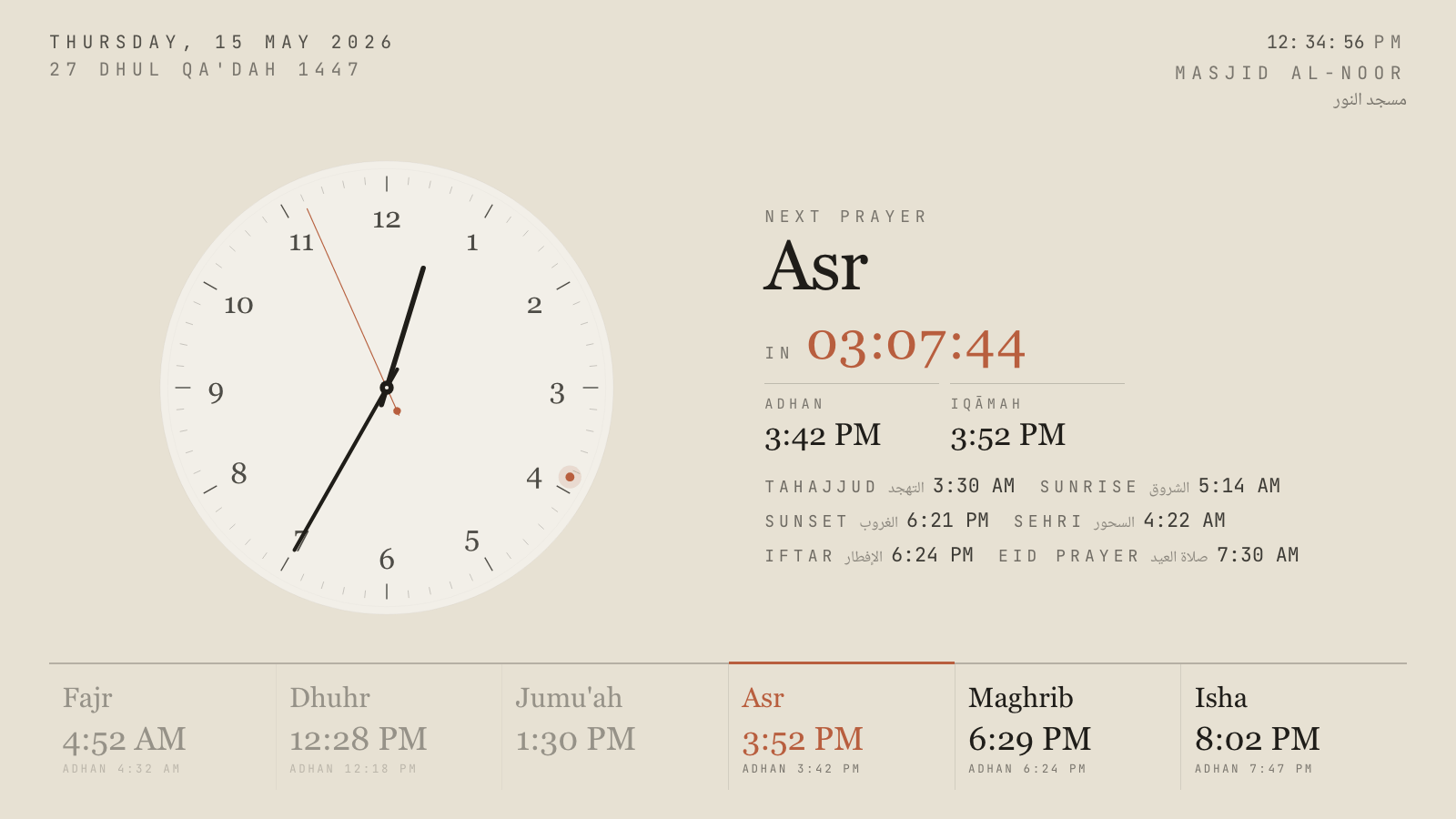
Hushed Hour, one of eighteen themes. Every one has a portrait variant.
What Masjidal actually sells
It helps to be precise here, because “Masjidal” means two different things depending on who is asking. To most Muslims it is a consumer brand: the Athan Frame, a Wi-Fi prayer clock for the hallway, sold alongside Athan+ on the app stores, decorative frames, wall mounts and Eid gift bundles. That is a retail business, and a good one — multi-currency checkout, AUD through GBP, the whole Shopify apparatus.
Al-Iqamahis the part a mosque committee actually evaluates. It is a cloud-managed bulletin board for TV screens: prayer and iqamah timings in a choice of layouts, images, YouTube video, embedded web content, Google Slides and Sheets, automatic daily verses and du’as, countdown timers before adhan and iqamah, colour-coded alerts when an iqamah time changes, funeral announcements, and a blank-screen mode that clears the display once the jama’ah has started. Masjidal reports 1,700+ mosques and 6,000+ screens across 27 countries. It is a real product with real deployments behind it.
The distinction matters because the two halves pull the company in different directions. Al-Iqamah exists partly to sell signage players, the way a printer exists to sell ink. That is not a criticism — it is a business model, and for some mosques it is the right one. But it explains almost every difference in the table further down this page.
Why mosques go looking for an Al-Iqamah alternative
These are the four reasons we hear most often from committees who arrive here already running Al-Iqamah. None of them are dealbreakers on their own; together they are why the search happens.
The screen you own is the wrong kind of screen.Al-Iqamah is distributed as a TV app for Android TV, Google TV and Amazon Fire TV. If the masjid’s hall already has a Samsung or an LG on the wall — which, between Tizen and webOS, is most of the TVs sold in the last decade — the app will not install on it. You buy a Fire Stick, or you buy Masjidal’s own player at $119.99, and now the display has a second device, a second power supply and a second thing that can be unplugged by a cleaner.
Split screen is behind the paywall, and the free tier is thin. Al-Iqamah Basic gives you prayer times, themes, countdowns, iqamah-change notifications and a slideshow of exactly one image. Putting the Jumu’ah notice next to the clock — the single most-requested thing any masjid display is asked to do — means Professional at $20/month. For a mosque running one screen, that is $240 a year to show an announcement.
It assumes the internet stays up. Al-Iqamah is cloud-managed and documented as requiring an active connection. Mosque Wi-Fi is famously not that. A router reboot during Maghrib should not take the clock off the wall.
Nobody tells you when a screen dies. Six thousand screens is a lot of screens, and the failure mode is always the same: it goes dark on a Tuesday, and someone mentions it the following Friday. Al-Iqamah does not publish display health monitoring or offline alerting.
The one structural difference
Everything else follows from this: Al-Iqamah is an app, and SalahClock is a page.
An app has to be built for each TV platform, installed, kept updated and permitted to run at boot. That is why the compatible-device list is a list at all, and why a signage player exists to make the list go away. A page has no list. Any device with a browser can open it — the Samsung in the main hall, the Fire Stick in the women’s section, the Raspberry Pi in the classroom, the iPad the youth group stopped using, a laptop during Ramadan when you need a fourth screen for one week and are not about to buy hardware for it.
It also changes what offline means. Because SalahClock installs as a progressive web app, the display keeps thirty days of computed prayer times on the device itself. If the Wi-Fi drops mid-Salah, the clock carries on — right times, right countdown, right adhan audio — and quietly re-syncs when the connection returns. There is no state where the congregation is looking at a loading spinner.
Knowing a screen is dark before the congregation does
This is the feature nobody asks for in the first meeting and everybody asks for in the second. Every SalahClock display sends a heartbeat. The dashboard shows Main hall — last seen 2 minutes ago, and if a screen stops reporting, Pro accounts get an email. The person who fixes it finds out from their inbox, not from the imam after Jumu’ah.
For a single-screen masjid this is a nicety. For the 1,700-mosque, 6,000-screen end of the market that Masjidal serves — multi-site trusts, Islamic schools with a screen in every corridor — it is the difference between managing a fleet and hoping for one.
SalahClock and Masjidal, line by line
Everything below is taken from each product’s own published material and checked in September 2026. Where a vendor does not publish something we say so rather than guessing. If you spot something out of date, tell us and we will fix it.
| Feature | SalahClock | Masjidal |
|---|---|---|
| Getting it on the wall | ||
| What runs the display | Any web browser | TV app (Android TV, Google TV, Fire TV) |
| Works on Samsung Tizen / LG webOS TVs | Yes | No |
| Vendor hardware needed | None | Optional signage player, $119.99 |
| Runs on a Raspberry Pi or old tablet | Yes | Android tablets only |
| Setup | Open a URL | Install app, pair, sign in |
| On the screen | ||
| Themes / layouts | 18, each with a vertical variant | Multiple themes |
| Portrait orientation | Yes | Yes |
| Split screen: clock beside content | Pro, $24/mo | Professional, $20/mo |
| Image slides | 10 on Plus, 30 on Pro | 1 free, 30 on Professional |
| YouTube video and embedded web pages | No | Yes |
| Google Slides / Sheets on screen | No | Yes |
| Prayer-in-progress fullscreen takeover | 3 phases | Blank screen after iqamah |
| Adhan audio at prayer times | 10 muezzin recordings | No |
| Languages | 10, plus 4 numeral systems | Multi-language |
| Keeping it running | ||
| Works with no internet | 30-day offline cache (PWA) | Connection required |
| Display heartbeat monitoring | Plus and above | No |
| Email alert when a screen goes dark | Pro | No |
| Wake lock and crash auto-recovery | Yes | Handled by the player |
| Changes reach every screen instantly | Yes | Yes |
| Beyond the display | ||
| Public mosque page your community can follow | Yes | Website integration |
| Website embed widget | Free on all plans | No |
| Public read API | Free on all plans | No |
| Branch screens mirroring a main clock | Yes | No |
| Donation platform | No | Yes |
| Consumer athan clock hardware | No | Athan Frame |
| Companion mobile app | No | Athan+ |
| Price | ||
| Free plan | 1 clock, 2 displays, adhan audio, offline | 1 image slide, no split screen |
| Entry paid plan | $8/mo billed yearly ($96) | $20/mo |
| Top self-serve plan | $24/mo billed yearly ($288) | $20/mo |
| Free trial | 14 days of Plus or Pro | Free tier, no time limit |
Prayer times and a rotating announcement on one screen, over three years
Assumes one screen and a TV the masjid already owns. The Al-Iqamah Professional figure includes Masjidal's own signage player at its current $119.99 price; if you already run a compatible Fire TV or Android TV device the subscription alone is $720 over three years. SalahClock figures are the annual billing rate. Neither figure includes the TV itself, and neither includes donation processing fees. Prices checked September 2026.
Where Masjidal is genuinely better
Every comparison page should have this section and most do not. If one of these matters more to your masjid than everything above, go and use Masjidal — we would rather you had the right display than our display.
Split screen is cheaper on Al-Iqamah
If a clock-beside-content split is the specific thing you need and nothing else on this page matters, Al-Iqamah Professional at $20/month undercuts SalahClock Pro at $24/month. Our content screens start at $8/month on Plus, but the true side-by-side combined screen is a Pro feature. Do the arithmetic for your own case rather than taking our word for it.
Embedded web content is genuinely useful, and we do not have it
Al-Iqamah can put a YouTube video, a live web page, a Google Slides deck or a Google Sheet straight on the screen. For a masjid that already runs its notices out of a shared Sheet, that is a real workflow we cannot match today. Our content screens take images and text you upload; they do not embed arbitrary web pages.
One vendor for hardware, donations and displays
Masjidal sells the screen software, the player, a donation platform and the consumer athan clocks your community buys for their own homes. If your committee's preference is a single invoice and a single support number covering all of it, that is a legitimate reason to choose them, and SalahClock does not compete on it. We do displays.
The Athan Frame has no equivalent here
Masjidal's home prayer clock is a lovely object and a real product. SalahClock's answer to the same need is software — open the clock on a tablet or a spare TV — which is cheaper and more flexible, but it is not a framed piece you hang in a hallway or give as a gift.
Moving across from Masjidal
Run both for a fortnight
Nothing forces a cutover. Create a free SalahClock clock, open it on any second screen or a laptop in the office, and leave Al-Iqamah on the main wall until the committee has seen both. Free means free — one clock, no card, no expiry.
Copy the iqamah times across, not the calculation method
Your posted iqamah times are the thing the congregation knows. Enter those first, exactly as they appear on the current screen, then set the calculation method to match. If the adhan times shift by a minute or two afterwards, the method is the dial to turn — SalahClock supports Muslim World League, ISNA, Umm al-Qura, Karachi, Egyptian, Diyanet and the rest, with a Hanafi or Shafi'i Asr toggle and per-prayer minute adjustments.
Point the existing TV at the URL
If the hall already has a smart TV, open its browser and go to the display URL — the Fire Stick or signage player becomes spare. If the TV has no usable browser, keep the Fire Stick and open the URL in Silk. Either way there is nothing to install and no pairing app.
Re-upload the slides you actually use
Most masjids find they are running three or four slides in rotation, not thirty. Upload those, set the per-slide duration, and schedule the seasonal ones — Ramadan and Eid countdowns are built in and appear on their own.
Questions mosques ask about Masjidal
Is Al-Iqamah free?
Do I need to buy Masjidal's signage player?
Can we keep our existing TV?
What happens to the display if the mosque Wi-Fi goes down?
Does SalahClock play the adhan?
Does SalahClock handle donations like Masjidal does?
Can several screens in the building show different things?
How long does switching take?
Put both on the same TV and decide.
SalahClock is free for one clock — no card, no trial clock ticking down. Set your location, type your Iqamah times, open the URL on the screen. If it is not better than what you have, close the tab.
- No hardware
- No app to install
- Works offline
- Free forever for one clock
Open-source non-profit waqf
Modular mosque suite from Paris
Browser-based display with donations built in