A Masjidbox alternative for mosques that only wanted the screen.
Masjidbox is three products in a trench coat — Screens, Applications and Pages — each with its own subscription. If all you needed was prayer times on the wall, you are paying for a suite to get a display.
SalahClock is the alternative to Masjidbox for a mosque whose actual requirement is a prayer-time screen. Masjidbox sells modules: Screens at €29/month, Applications at €29/month, Pages at €15/month, or €62/month for the lot. SalahClock does the screen and does it thoroughly — eighteen themes, adhan audio, content slides, offline cache, heartbeat monitoring — for $8/month billed yearly, with a free tier that is not restricted to a single playlist or a single manager.
Masjidbox is the better answer if you genuinely need all three modules, or if seventeen display languages matters to your congregation. Their language coverage runs from Somali and Swahili to Bosnian, Albanian, Burmese and Japanese, and ours does not go that wide.
- Choose Masjidbox if
- You want the screen, the mobile app and the mosque website from one vendor, or you need a display language we do not carry.
- Choose SalahClock if
- The screen is the job, the budget is a mosque budget, and you would rather not buy a suite to get a clock.
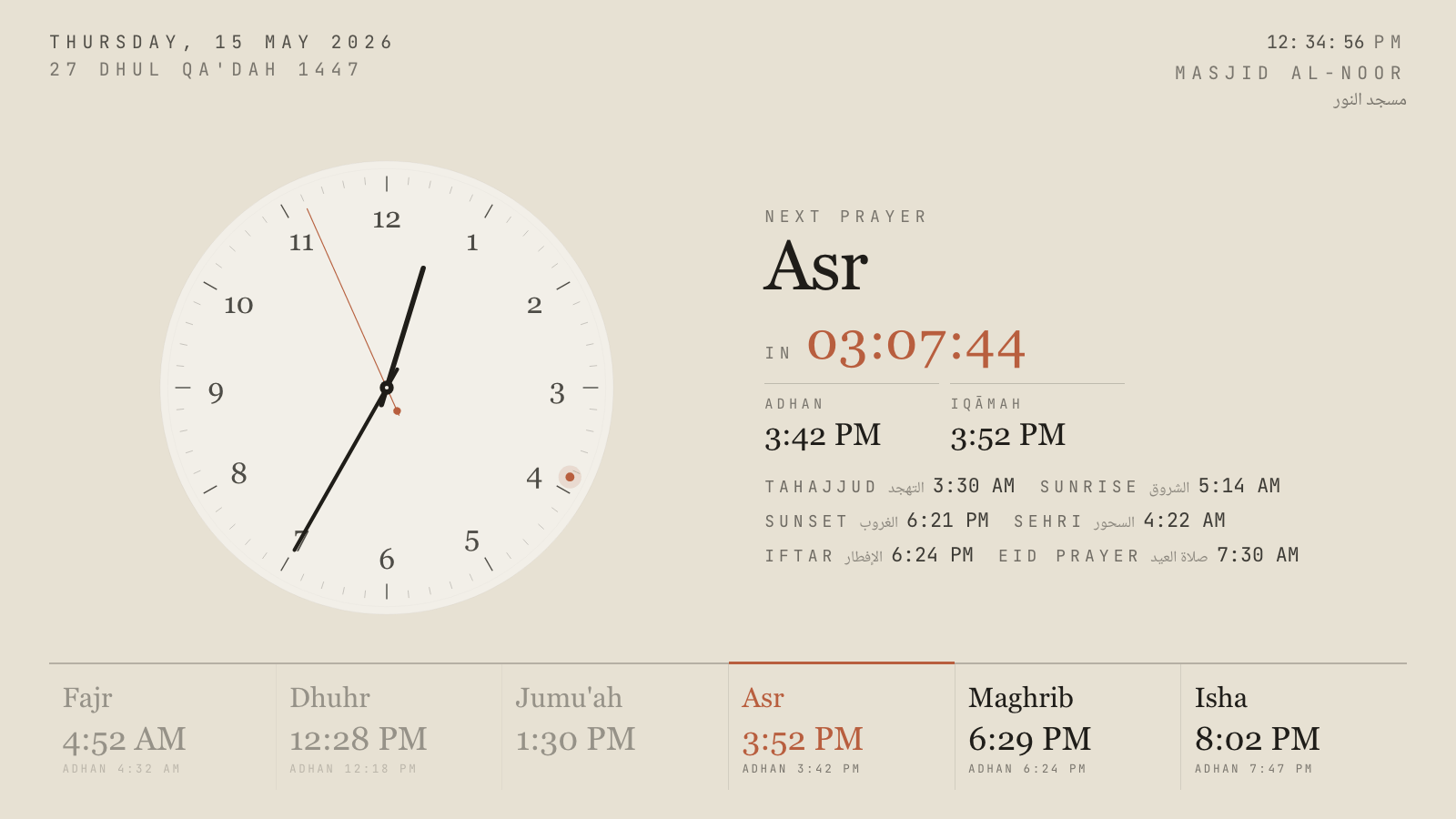
Hushed Hour, one of eighteen themes. Every one has a portrait variant.
The module problem
Masjidbox has been going since 2015, is based in Paris, is unfunded, and has 2,500 mosques on it. That is a decade of steady building and it deserves respect. The product is organised as a suite: Screens for signage, Applications for the community mobile app, Pages for the mosque website, with Donations, Widgets, a calendar and a live-streaming tool alongside.
Each of the three carries its own subscription. Screens Silver is €29 a month. Applications Silver is another €29. Pages Silver is €15. Take the global offer and it is €62 a month, which they will correctly point out saves you €11 against buying them separately. Over three years that bundle is roughly €2,230.
For a large, well-resourced masjid running an app and a website and four screens, that may be perfectly fair value. For the very common case — one hall, one TV, a committee that wanted the iqamah times to stop drifting — it is a suite price for a single feature.
What the free tiers actually give you
Both products have a free plan, and the shapes are quite different.
Masjidbox Screens Free gives you one manager, basic support, and one playlist containing five slides. It is a genuine free tier and it will put prayer times on a TV. The ceiling arrives quickly: one person can administer it, and the content rotation is capped.
SalahClock Free gives you one clock across two displays, four starter themes including light and dark, adhan audio with three muezzin recordings, all ten languages and four numeral systems, the bilingual announcement banner, the thirty-day offline cache, and a public URL your community can open at home. There are no image slides on the free plan — that is what Plus is for — but everything that makes the clock a clock is included, permanently, without a card.
The player, and whether you need one
Masjidbox will sell you a Masjidbox Player, a small media device that plugs into any screen with an HDMI port. Their pitch is reasonable: you do not need a smart TV, and a dedicated appliance behaves more predictably than a TV’s own software.
SalahClock’s answer is that a browser is the appliance. The display page takes a wake lock so the panel never sleeps, goes fullscreen, hides the cursor after idle, and reloads itself after a crash or a long outage. Run it on the smart TV, a $40 stick, a Raspberry Pi or an old tablet — all of them behave the same, because the hardening lives in the page rather than in the device.
Languages, honestly compared
This is the one specification where Masjidbox is clearly ahead and it is worth stating plainly. They list seventeen display languages: Arabic, English, French, Spanish, Italian, German, Dutch, Turkish, Swahili, Burmese, Bosnian, Albanian, Indonesian, Somali, Urdu, Japanese, Danish and Russian. For a Somali community in Minneapolis or a Bosnian jamaat in Missouri, that is not a line on a spec sheet, it is whether the screen speaks to the room.
SalahClock carries ten languages and four numeral systems — Latin, Arabic-Indic, Eastern Arabic-Indic and Devanagari — with proper right-to-left layout on every theme, and lets you override the label for any prayer so the screen uses the word your community actually uses. That is deeper on typography and shallower on coverage. If your language is on their list and not on ours, believe the list.
SalahClock and Masjidbox, line by line
Everything below is taken from each product’s own published material and checked in September 2026. Where a vendor does not publish something we say so rather than guessing. If you spot something out of date, tell us and we will fix it.
| Feature | SalahClock | Masjidbox |
|---|---|---|
| What you are buying | ||
| Sold as | One plan, everything in it | Screens, Applications and Pages, priced separately |
| Entry paid price | $8/mo billed yearly ($96) | €29/mo for Screens alone |
| Everything bundled | $24/mo billed yearly ($288) for Pro | €62/mo global offer |
| Admin logins | 1 per account, no roles | 1 on Free, unlimited on Silver |
| Free plan content | Announcement banner, no image slides | 1 playlist, 5 slides |
| Free trial of the paid plan | 14 days of Plus or Pro | Free tier, no time limit |
| On the screen | ||
| Themes | 18, each with a portrait variant | Layout options, colours, logo |
| Portrait orientation | Yes | Yes |
| Day-adaptive themes | Yes | No |
| Three-phase prayer takeover | Yes | No |
| Adhan audio at prayer times | 10 muezzin recordings | Yes |
| Custom timetable instead of calculation | Per-prayer overrides | Yes |
| Live streaming on screen | No | Silver |
| Display languages | 10, plus 4 numeral systems | 17 |
| Running it | ||
| What runs the display | Any web browser | Any HDMI screen, Masjidbox Player optional |
| Works offline | 30-day offline cache (PWA) | Yes |
| Display heartbeat monitoring | Plus and above | No |
| Email alert when a screen goes dark | Pro | No |
| Multiple screens, different content | Plus and above | Yes |
| Screen analytics | No | Silver |
| Beyond the screen | ||
| Community mobile app | No | Applications module |
| Mosque website builder | Public mosque page | Pages module |
| Donations | No | Yes |
| Website prayer-times widget | Free on all plans | Yes |
| Public read API | Free on all plans | Widgets module |
| Branch screens mirroring a main clock | Yes | No |
Three years of mosque screens
Masjidbox figures are the published monthly Silver prices over 36 months, converted at €1 = $1.09 and rounded; Masjidbox also advertises an additional 15% discount for subscribing to more than one Silver plan, which is not applied here. SalahClock figures are the annual billing rate. No figure includes hardware, the TV, or payment processing fees. Prices checked September 2026.
Where Masjidbox is genuinely better
Every comparison page should have this section and most do not. If one of these matters more to your masjid than everything above, go and use Masjidbox — we would rather you had the right display than our display.
Seventeen display languages
Masjidbox covers languages we do not — Somali, Swahili, Bosnian, Albanian, Burmese, Danish, Japanese among them. If your congregation reads one of those, that is decisive and nothing else here changes it.
It is a suite, and some mosques want a suite
A mosque that needs a website, a community app and screens genuinely benefits from one vendor, one login and one set of prayer times feeding all three. Buying those separately and wiring them together is real work. If that is your situation, the €62/month is buying something.
Screen analytics and live streaming
Masjidbox Silver reports on what the screens are showing and can put a live stream on them. We have neither. For a masjid that streams Jumu'ah to an overflow room, that is a working feature today on their side and a roadmap item on ours.
More than one person can administer it
Masjidbox Silver gives unlimited managers. SalahClock is one login per account with no roles and no audit log, so a committee where three people share responsibility for the times has to share a password. That is a real gap on our side.
Ten years and 2,500 mosques
Masjidbox has been shipping since 2015 without outside funding. Longevity is a reasonable thing for a committee to weigh, and they have more of it than we do.
Moving across from Masjidbox
Start on the free plan, on a second screen
Make a SalahClock clock, open it on a spare display or a laptop, and leave Masjidbox running on the main wall. Nothing expires and no card is required, so the comparison can take as long as the committee takes.
Bring your custom timetable, not just the method
If you run a fixed printed timetable rather than calculated times, that transfers: set the calculation method as the base and then apply per-prayer overrides so the screen shows exactly the times you publish. Jumu'ah gets its own khutbah and iqamah entries, separate from Dhuhr.
Decide module by module
You do not have to leave Masjidbox entirely. Several mosques keep Pages for the website and move only the screens. The subscriptions are separate, which cuts both ways — it is why the bundle is expensive, and it is also why you can drop one.
Reuse the Masjidbox Player
If a player is already mounted behind the TV, point its browser at the SalahClock display URL. It is an HDMI device with a network connection, which is all we need.
Questions mosques ask about Masjidbox
How much does Masjidbox cost?
Is there a free Masjidbox plan?
Do I need the Masjidbox Player?
Can SalahClock show a custom timetable rather than calculated times?
Does SalahClock build our mosque website?
What about our community mobile app?
Which languages does SalahClock support?
Can we run both while we decide?
Put both on the same TV and decide.
SalahClock is free for one clock — no card, no trial clock ticking down. Set your location, type your Iqamah times, open the URL on the screen. If it is not better than what you have, close the tab.
- No hardware
- No app to install
- Works offline
- Free forever for one clock
Open-source non-profit waqf
Hardware brand with a masjid signage app
Masjid ERP — donations, membership, classes