A MAWAQIT alternative for mosques that want the screen, not the project.
MAWAQIT is free, open source and run as a waqf, and we are not going to pretend otherwise. But it is an app on a box you have to buy, set up and maintain, and your mosque has to be approved before it appears. SalahClock is a URL. That difference is most of this page.
SalahClock is the alternative to MAWAQIT for mosques that want a display running this afternoon with no hardware and no approval queue. MAWAQIT runs as an Android TV or Raspberry Pi application, and before your mosque can sync you must register it on their site with two photographs and proof the mosque exists. That review is a feature — it is what keeps their directory trustworthy — but it is a wait, and it rules out anyone who is not a registered mosque.
SalahClock opens in any browser, publishes in about sixty seconds, keeps thirty days of prayer times cached on the device for Wi-Fi outages, monitors whether the screen is still alive, and works just as well in a company prayer room or a school hall as in a masjid. MAWAQIT remains the better choice if price is the deciding factor and you have someone technical who enjoys the Raspberry Pi — it is free forever, with no subscription and no advertising, and nothing we sell beats free.
- Choose MAWAQIT if
- Cost is the deciding factor, you have a technical volunteer, and your mosque is registered and public.
- Choose SalahClock if
- You want it on the wall today, on the TV you already own, with no box to maintain and someone watching whether the screen is still alive.
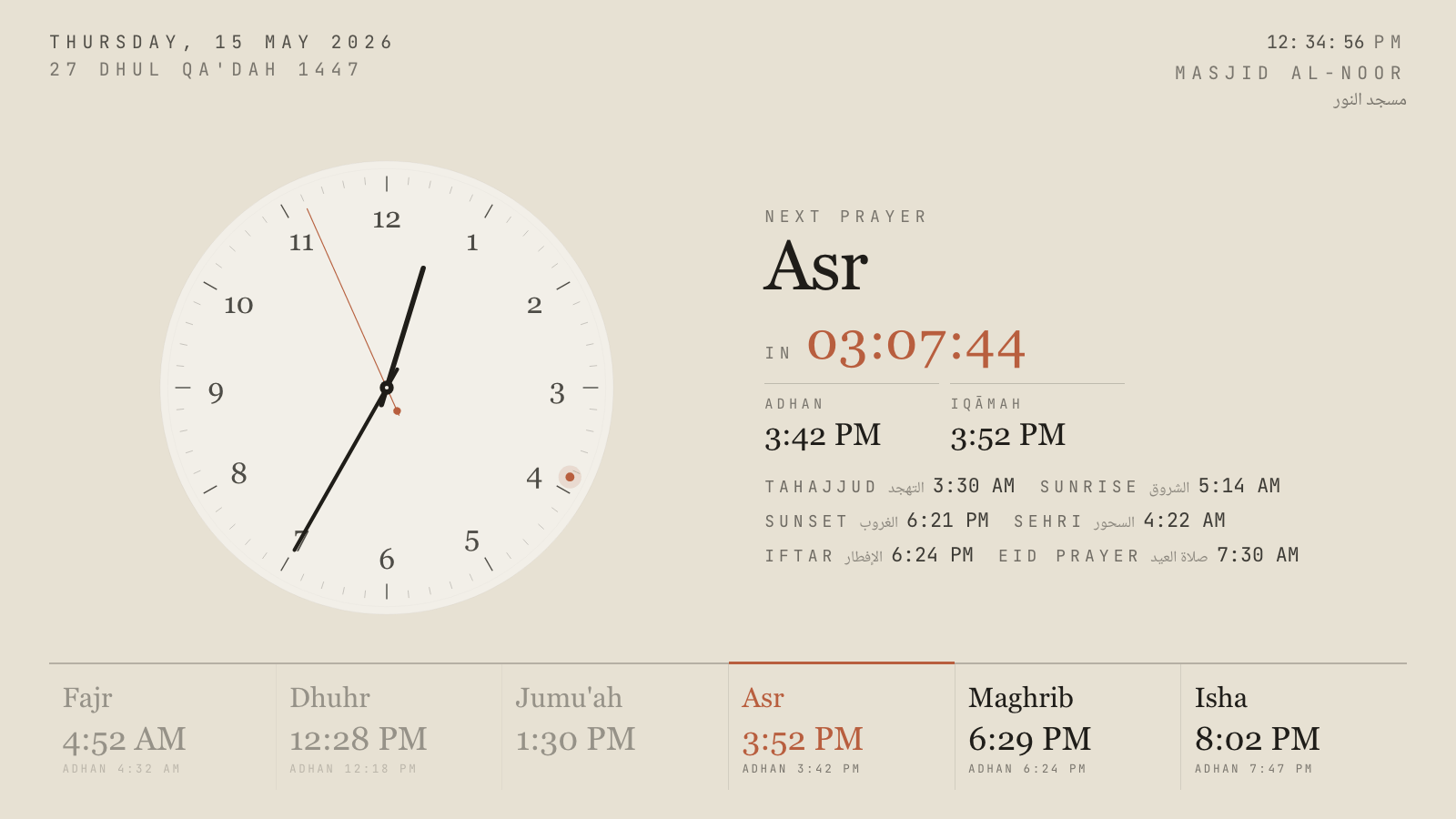
Hushed Hour, one of eighteen themes. Every one has a portrait variant.
First, the part where we give MAWAQIT its due
It is difficult to write a comparison page against a charity. MAWAQIT is a 501(c)(3) non-profit and a dedicated waqf. It has said publicly that it will never become a paid service and will never carry advertising, and after years of operating at the scale of ten thousand installations across a hundred and sixty countries, it has kept that promise. The Android TV app, the Raspberry Pi image and the mobile apps are open source. The Raspberry Pi Foundation has written about it. Nothing in the rest of this page is a criticism of that.
What follows is narrower: MAWAQIT and SalahClock make opposite engineering choices, and those choices suit different mosques. If you read this page and conclude MAWAQIT is right for you, that is a perfectly good outcome and you should go and install it.
The box on the back of the TV
MAWAQIT’s TV product is an Android application. To run it you need an Android TV, an Android TV box, or a Raspberry Pi 3 or 4 flashed with their image, connected to the screen over HDMI. This is well documented and well supported, and a Raspberry Pi running a mosque display is a genuinely charming thing. It is also a computer, and computers in mosques have a way of becoming somebody’s unpaid second job — the SD card that corrupts after two years, the app that needs updating, the box that boots to a home screen after a power cut instead of to the clock.
SalahClock has no box. The hall’s existing Samsung or LG opens the display URL in its own browser and that is the entire installation. If the TV has no usable browser, a $40 Fire Stick works, or the Raspberry Pi you already bought for MAWAQIT works too — we are not fussy about what opens the page, because from our side it is just a page.
The screen also defends itself. SalahClock holds a wake lock so the TV never sleeps, goes fullscreen and hides the cursor, and reloads itself after a crash or a long network outage. Nothing about that requires a technical volunteer to be reachable.
Registration, approval, and who is allowed to have a display
To synchronise a mosque with MAWAQIT you register it on their website and supply two photographs — exterior and interior — plus proof that the mosque exists. A human reviews it. This is the right design for what MAWAQIT is: a public directory that millions of worshippers use to find their local masjid, where a fake entry would be worse than a missing one.
It is also a gate. It takes time you may not have if Ramadan starts in nine days. And it excludes a whole category of people who need exactly the same screen: the company that has set aside a meeting room as a musalla, the Islamic school that wants the times in every corridor, the family that wants the clock on the kitchen tablet, the community centre with a prayer space but no registration.
A SalahClock clock is created in the dashboard and live immediately. Listing it in our public directory is a separate, optional step — you can run a completely private display forever and never appear anywhere. That is the trade: MAWAQIT gets a directory you can trust, we get a product anyone can use in the next minute.
What the screen actually looks like
MAWAQIT’s display is functional and consistent — the same recognisable layout in mosques from Lille to Jakarta, with adjustable colours and a theme choice. Consistency is a real virtue, and a congregation that has travelled will recognise it.
SalahClock takes the other view: that the display is part of the room. There are eighteen themes, from a warm calligraphic manuscript to a high-contrast minimal dark built to be read from the back of a hall, with heritage, editorial, geometric and zellige-tile designs in between. Every one of them has a portrait variant, so a vertical screen in an entrance is not an afterthought. Several are day-adaptive — light through Dhuhr and Asr, dark for Isha — without anybody touching a setting.
There is also a three-phase prayer takeover that we have not seen elsewhere. A few minutes before the adhan the screen changes to say so, with a countdown. In the gap between adhan and iqamah it counts down to the jama’ah with rotating reminders. Once the prayer starts, the countdown disappears and the screen simply says the prayer is in progress, so nobody walking in late is reading a timer.
Offline, and knowing when a screen has died
Both systems survive a network blip, but differently. MAWAQIT caches on the device it runs on, which is one of the advantages of shipping a native app. SalahClock installs the display as a progressive web app and holds thirty days of computed prayer times, plus the adhan recordings, locally — so a router reboot mid-Maghrib changes nothing on screen.
The part MAWAQIT does not cover is the other side of that: telling you. Every SalahClock display sends a heartbeat, the dashboard shows when each screen was last seen, and Pro accounts get an email when one stops reporting. Screens die quietly. Somebody should find out before Jumu’ah.
SalahClock and MAWAQIT, line by line
Everything below is taken from each product’s own published material and checked in September 2026. Where a vendor does not publish something we say so rather than guessing. If you spot something out of date, tell us and we will fix it.
| Feature | SalahClock | MAWAQIT |
|---|---|---|
| Getting it on the wall | ||
| What runs the display | Any web browser | Android TV app or Raspberry Pi image |
| Works on Samsung Tizen / LG webOS TVs | Yes | No |
| Hardware required | None beyond the screen | Android TV box or Raspberry Pi 3/4 |
| Approval before you can go live | None | Mosque registration with photos and proof |
| Time to first display | About a minute | Install, flash or pair, then wait for review |
| Usable by a home, office or school | Yes | Mosque-registered accounts |
| On the screen | ||
| Themes | 18, each with a portrait variant | Theme and colour options |
| Day-adaptive themes | Yes | No |
| Three-phase prayer takeover | Yes | No |
| Adhan audio at prayer times | 10 muezzin recordings | Yes |
| Hadith and reminder rotation | Announcement and image slides | Yes |
| Content screen: slides beside the clock | Plus and Pro | No |
| Languages | 10, plus 4 numeral systems | Arabic, English, French, German, Turkish and more |
| Keeping it running | ||
| Works with no internet | 30-day offline cache (PWA) | Yes |
| Display heartbeat monitoring | Plus and above | No |
| Email alert when a screen goes dark | Pro | No |
| Wake lock and crash auto-recovery | Yes | Device-dependent |
| Who maintains the device | Nobody — there is no device | Your volunteer |
| Reach and ecosystem | ||
| Public directory for worshippers | Discover | 160+ countries, the main draw |
| Companion mobile app | Public clock page in the browser | iOS and Android |
| Website embed widget | Free on all plans | Widget available |
| Public read API | Free on all plans | Community API |
| Alexa, smartwatch, Home Assistant | No | Yes |
| Community follows your posted iqamah at home | Yes | Yes |
| Branch screens mirroring a main clock | Yes | No |
| Open source | No | Yes |
| Price | ||
| Software cost | Free tier, then $8/mo billed yearly | Free forever |
| Advertising | None, on any plan | None, ever |
| Funded by | Paid plans | Donations and endowment |
| Support | Email, 48h on Plus and 24h on Pro | Community and help centre |
One screen, three years, everything included
MAWAQIT's software is free with no subscription of any kind, so its bars are one-off hardware only, at typical retail for a Fire TV Stick and a Raspberry Pi 4 starter kit. SalahClock Free assumes a smart TV already on the wall, which is also the assumption behind the Plus bar. Nobody's figure includes the TV. If price is the only axis you care about, MAWAQIT wins this chart and we are not going to draw it differently. Prices checked September 2026.
Where MAWAQIT is genuinely better
Every comparison page should have this section and most do not. If one of these matters more to your masjid than everything above, go and use MAWAQIT — we would rather you had the right display than our display.
It is free, permanently, and that is not a trick
MAWAQIT is a registered non-profit and a waqf. It has committed publicly to never charging and never advertising, and it has held to that at a scale where monetising would have been easy. If your masjid's budget is genuinely zero and will stay zero, that is a complete and sufficient argument, and no feature on this page outweighs it.
The directory is a network we cannot match yet
Ten thousand installations in a hundred and sixty countries means a worshipper who lands in an unfamiliar city opens MAWAQIT and finds the mosque down the road with its real posted iqamah. Our Discover directory is real and growing, but it is not that. If being findable inside the biggest mosque network is the point, they have it and we do not.
Open source, and audit-able
The Android TV app, the Raspberry Pi image and the mobile clients are published. If your committee wants to read the code, self-host, or simply know the project survives its current maintainers, that is a real governance advantage. SalahClock is not open source.
Alexa, smartwatches and Home Assistant
MAWAQIT has spent years building an ecosystem around the mosque: voice assistants, a watch app, a Home Assistant integration for people who automate their houses around salah. We have an AI assistant integration for running the display, but nothing on that side. If the ecosystem is what you are buying, buy theirs.
Moving across from MAWAQIT
You do not have to switch to try it
Leave MAWAQIT exactly where it is. Make a free SalahClock clock, open the URL on a second screen or the office laptop, and let the committee look at both for a fortnight. The free plan has no expiry and asks for no card, so there is no clock running down.
Your iqamah times transfer by hand, and that is a five-minute job
There is no import, because there are only five numbers plus Jumu'ah. Type them in as they are posted today. Set the calculation method to match what MAWAQIT is using so the adhan times line up, then use per-prayer minute adjustments for any residual difference.
Repurpose the Raspberry Pi instead of retiring it
If the Pi is already mounted behind the TV and working, point its browser at the SalahClock display URL and leave it there. You lose the flashing and updating, keep the hardware, and the screen behaves the same after a power cut because the page reloads itself.
Keep your MAWAQIT directory listing
Nothing stops a mosque being listed on MAWAQIT for discovery and running SalahClock on the wall. Several do. The two systems do not know or care about each other.
Questions mosques ask about MAWAQIT
Is MAWAQIT really free?
Do I need a Raspberry Pi to use MAWAQIT?
Why does MAWAQIT ask for photos of the mosque?
Can I use SalahClock for a prayer room at work or a school?
Is SalahClock open source?
What does SalahClock do that MAWAQIT does not?
Can we run both at once?
Which is more accurate?
Put both on the same TV and decide.
SalahClock is free for one clock — no card, no trial clock ticking down. Set your location, type your Iqamah times, open the URL on the screen. If it is not better than what you have, close the tab.
- No hardware
- No app to install
- Works offline
- Free forever for one clock
Hardware brand with a masjid signage app
Feature-dense signage, strongest in Southeast Asia
Modular mosque suite from Paris